

Smart Event Manager is constantly evolving. We’re working on new features every day to help you organize the most beautiful events even more efficiently and effortlessly. Both our testers and the customers working in the prerelease have extensively tested and provided valuable feedback over the past months. Now these functionalities are available to everyone. Read on to discover the latest enhancements and new possibilities!
New functionalities
Settings
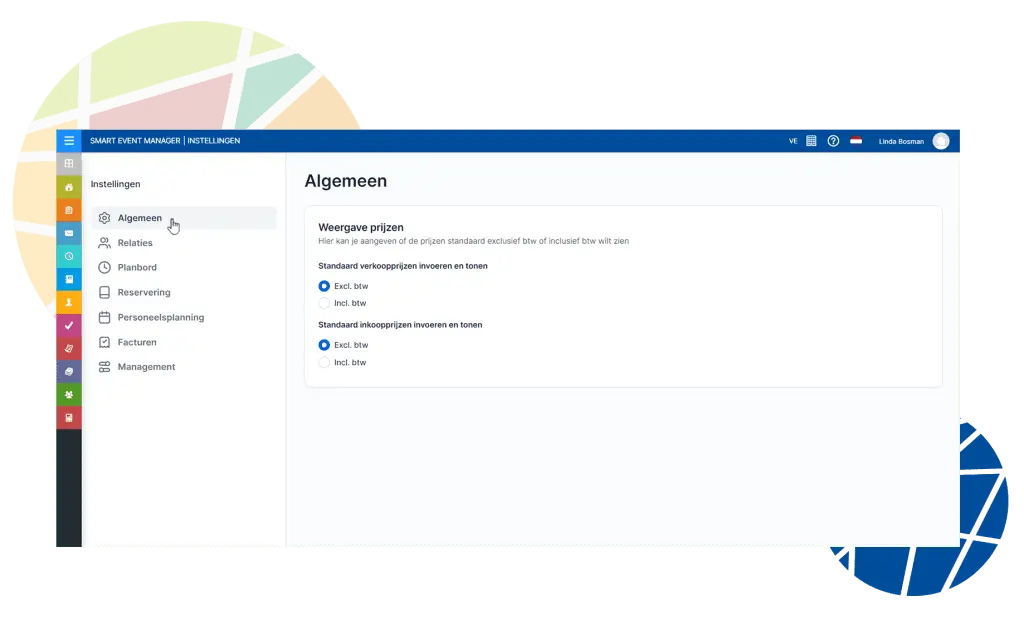
A Settings tile has been added to SEM online. This tile collects all settings and allows you to manage them from a single location. In addition, many settings that previously could only be adjusted by our team in the database are now directly accessible to you, giving you full control!
For example, you can define the debtor number, set the default number of days that a reservation is held as an option, or set the default status of a new invoice (In progress/Completed).
SEM Import (Premium and Enterprise)
It is now possible to automatically import emails from your linked Microsoft Office 365 and Exchange email account. This automatically saves responses to reservations and invoices in the logbook of the reservation in SEM. This way, everyone always has an overview of the latest communication with the relation.
Adding signature during online approval
The option to request a digital signature from the customer when accepting a quotation has been added to the online approval process.
Multilingual automatic processes (Enterprise)
Do you use multilingualism? You can now create English and German templates and link them to the automated processes. The process recognizes the language of the relation and automatically selects the correct email template.
Integrations
The developments of integrations are also ongoing. Recently, API integrations have been implemented with Meetingselect, MeetingReview, MR. Einstein, and Snelstart. A complete overview of our integrations can be found on the integrations page.
Buitenplaats Kameryck is enthusiastic about the integration between SEM and MeetingReview; you can read about their experience in this article.
New design
The look & feel of Smart Event Manager is being renewed. Not all tiles and screens will be converted to the new design at the same time, but we are doing this step by step. The following tiles have already been refreshed with a new look:
- Standard reservations
- Payment terms
- Payment methods
- Reservation codings
- Reservation statuses
- Person specification types

Online Booking
This completely newly built module is now fully up and running, using the latest technologies and appearance, ready for the future! This allows you to better entice your guests to book through your website. All the familiar functions remain, and several new features will be added throughout the year. Want to know more about the renewed Online Booking module?
Release notes in the Knowledge Center
And that’s not all! In our Knowledge Center, you will find answers to all your questions, as well as a complete overview of the changes implemented in the release notes. You can access the Knowledge Center by logging in to your Smart Event Manager environment and then click on the Help / Knowledge Center tile or by clicking the question mark in the top right corner.
Updating
If you work in the basic application (the Windows version), we recommend installing the latest version. If you work in SEM Online, the update will be automatic, and you can immediately use the new features. Would you like to switch to SEM Online? Then please contact support@voorraedt.nl.


