More features

Even more features with Smart Event Manager

In addition to the basic functionalities, Smart Event Manager offers even more advanced features. This allows you to further improve process management and ensure everything runs smoothly on the day of the event.

Work sheets

The work sheet functionality allows you to visualize the entire event process and communicate with all parties involved. This way, everyone knows exactly what’s expected of them and when.

Production lists

With Smart Event Manager, you can easily create production lists for different departments. This makes it clear to everyone what needs to be done and who is responsible for what.

Last-minute changes

Last-minute changes can cause a lot of stress and confusion. With Smart Event Manager, you can easily implement these changes and communicate them to all parties involved.

Purchasing and inventory management

With the purchasing and inventory management functionality, you can easily make purchases and track inventory. This way, you always know exactly what’s in stock and what’s out of stock, allowing you to make timely purchases when needed.

Automatic processes

Smart Event Manager offers various automated processes, such as invoicing and payment reminders. This saves you a lot of time and makes the process more efficient.

Actions for employees or departments

With action management, you can easily assign actions to employees or departments. These actions can have different levels, such as tasks that need to be completed immediately or at a later stage. By assigning actions to specific employees or departments, you create clarity and accountability.

Online quote approval

With the ability to approve quotes online, you save a lot of time and avoid delays in the booking process. The customer can immediately approve the quote and finalize the reservation

Online evaluations

After the event, you can easily ask the customer to complete an evaluation form. This way, you’ll receive valuable feedback on the service and can use this to further improve your service.

Requesting information

Customers can easily request information or ask questions about the event through the reservation system. This allows quick and efficient communication and increases customer satisfaction.

Multilingualism

Multilingual quotes, confirmations and invoices. With Smart Event Manager, you can send quotes, confirmations and invoices in multiple languages. This allows you to serve customers from different countries and expand your international reach.

Insight into open or completed actions

With Smart Event Manager, you always have insight into the progress of actions and tasks. You can see at a glance which actions are still open and which have already been completed. This allows you to make timely adjustments if delays occur and prevents tasks from being overlooked.

Advanced pricing

With Smart Event Manager, you can easily set up advanced pricing, such as price scales, price groups and mixed VAT rates. This allows you to set different prices for different groups of customers and allows you to adjust pricing according to demand.

Time dependent pricing
Time-dependent pricing in Smart Event Manager allows you to apply different rates for different time periods, such as hour, day, part of the day, or night. This allows you to flexibly adjust rates based on supply and demand.
 
Cost prices

Managing cost prices is crucial for determining an event’s profit margin. Smart Event Manager makes it easy to track cost prices and gain insight into the costs of various event elements.

Indexing prices

Indexing prices is a useful feature that allows you to automatically adjust prices based on inflation or other factors. This eliminates the need to manually adjust prices and keeps your prices always up-to-date.

Handle price changes

Sometimes you need to change prices, for example, due to market changes or new regulations. With Smart Event Manager, you can easily handle price changes and implement them across all associated elements of an event.

Automatic discount calculations

Discounts are an important part of event pricing. Smart Event Manager allows you to automatically apply discount calculations based on various criteria.

Cost centers and units

Managing cost centers and cost units is essential for proper financial accounting. With Smart Event Manager, you can easily assign cost centers and cost units to different elements of an event, such as staff, catering and venue.

SEM TV

With SEM TV, the planboard can be displayed on a large screen in a central location within the organization. This allows everyone to see what’s planned and what still needs to be done. It provides a complete overview of all events and activities, so you’re always up to date.

Linking personal calendar

Smart Event Manager offers the ability to link the planboard to your personal calendar. This allows you to easily schedule appointments and deadlines without having to switch between different applications. Everything comes together in one clear environment.

Day, week and month display

With the daily and weekly view of the planning board, you always have an up-to-date overview of what’s planned. This allows you to see at a glance what’s happening and when. The weekly view is useful for long-term planning, while the daily view is ideal for short-term planning.

Timeline, calendar and list view

The Smart Event Manager planning board offers various views, allowing you to work in the way that suits you best. The timeline view provides a clear overview of the schedule and timeline. The calendar view is useful for quickly seeing which days are still available and which are already fully booked. The list view provides a clear overview of the events in a table.

Capacity charts

With the capacity graphs of the planboard, you can see at a glance how busy it is and what is still available. It provides a visual overview of available capacity at any time of day. This allows you to quickly assess whether you have enough staff to host the event.

Group tickets

In Smart Event Manager, you can only create group tickets, not individual tickets. This means you create one ticket for the entire group attending the event. This way, you don’t have to generate a separate ticket for each individual guest, saving time in the ticketing process.

Scanning of tickets

Once a group has booked, you can display the ticket’s QR code or barcode directly on the confirmation. This means the group doesn’t have to go to the box office first, but can enter directly with their ticket. Smart Event Manager even has a scanner that can recognize the ticket codes, but it’s preferable to connect directly to the box office or ticketing system.

Linking with ticketing systems

Although Smart Event Manager is not a ticketing system, it can be interfaced with other ticketing systems. If you are already using a ticketing system and want to integrate SEM, it is possible to load the codes from SEM into the ticketing system. This way, the codes can be recognized by the ticketing system and you can scan the tickets easily and quickly.

Optimize internal communication and process management with Smart Event Manager

Organizing events can be a complex and challenging task involving various departments and processes. Smart Event Manager offers a solution to optimize internal communication and process management, enabling your team to work more efficiently and improve the overall quality of the event.

 
Work sheets

The work sheet functionality allows you to visualize the entire event process and communicate with all parties involved. This way, everyone knows exactly what’s expected of them and when.


Production lists

With Smart Event Manager, you can easily create production lists for different departments. This makes it clear to everyone what needs to be done and who is responsible for what.

Last-minute changes

Last-minute changes can cause a lot of stress and confusion. With Smart Event Manager, you can easily implement these changes and communicate them to all parties involved.

Purchasing and inventory management

With the purchasing and inventory management functionality, you can easily make purchases and track inventory. This way, you always know exactly what’s in stock and what’s out of stock, allowing you to make timely purchases when needed.

Automatic processes

Smart Event Manager offers various automated processes, such as invoicing and payment reminders. This saves you a lot of time and makes the process more efficient.

External communication

With the external communication features of Smart Event Manager, you can impress your customers with professional and multilingual proposals, confirmations, and invoices. These can be sent in both HTML and Word formats, fully tailored to your branding and preferences.

Online quote approval

With the ability to approve quotes online, you save a lot of time and avoid delays in the booking process. The customer can immediately approve the quote and finalize the reservation

Automatic processes

Smart Event Manager offers various automated processes, such as invoicing and payment reminders. This saves you a lot of time and makes the process more efficient.

Online evaluations

After the event, you can easily ask the customer to complete an evaluation form. This way, you’ll receive valuable feedback on the service and can use this to further improve your service.

Requesting information

Customers can easily request information or ask questions about the event through the reservation system. This allows quick and efficient communication and increases customer satisfaction.

Multilingualism

Multilingual quotes, confirmations and invoices. With Smart Event Manager, you can send quotes, confirmations and invoices in multiple languages. This allows you to serve customers from different countries and expand your international reach.

Manage financial records with Smart Event Manager

An important part of event organization is managing finances. With Smart Event Manager, you have a complete solution for the financial administration of your events. From advanced pricing and cost prices to price changes, everything is clearly tracked and analyzed.

Advanced pricing

With Smart Event Manager, you can easily set up advanced pricing, such as price scales, price groups and mixed VAT rates. This allows you to set different prices for different groups of customers and allows you to adjust pricing according to demand.

Time dependent pricing

Time-dependent pricing in Smart Event Manager allows you to apply different rates for different time periods, such as hour, day, part of the day, or night. This allows you to flexibly adjust rates based on supply and demand.

Cost prices

Managing cost prices is crucial for determining an event’s profit margin. Smart Event Manager makes it easy to track cost prices and gain insight into the costs of various event elements.

Handle price changes

Sometimes you need to change prices, for example, due to market changes or new regulations. With Smart Event Manager, you can easily handle price changes and implement them across all associated elements of an event.

Automatic discount calculations

Discounts are an important part of event pricing. Smart Event Manager allows you to automatically apply discount calculations based on various criteria.

Cost centers and units

Managing cost centers and cost units is essential for proper financial accounting. With Smart Event Manager, you can easily assign cost centers and cost units to different elements of an event, such as staff, catering and venue.

Indexing prices

Indexing prices is a useful feature that allows you to automatically adjust prices based on inflation or other factors. This eliminates the need to manually adjust prices and keeps your prices always up-to-date.

Planboard

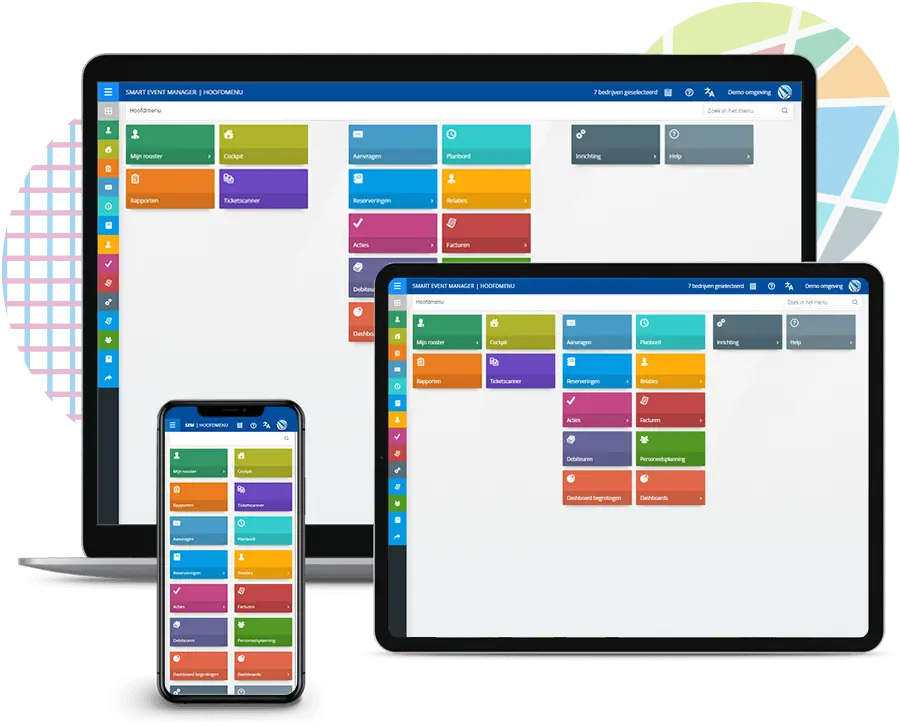
The planning board in Smart Event Manager is an essential tool for keeping an overview of your events. It provides a complete and up-to-date view of all activities, tasks, and deadlines. At a glance, you can see what’s scheduled and when. The planning board allows you to zoom in on the details of a single event, as well as view an overview of all events.

Day, week and month display

With the daily and weekly view of the planning board, you always have an up-to-date overview of what’s planned. This allows you to see at a glance what’s happening and when. The weekly view is useful for long-term planning, while the daily view is ideal for short-term planning.

Timeline, calendar and list view

The Smart Event Manager planning board offers various views, allowing you to work in the way that suits you best. The timeline view provides a clear overview of the schedule and timeline. The calendar view is useful for quickly seeing which days are still available and which are already fully booked. The list view provides a clear overview of the events in a table.

Capacity charts

With the capacity graphs of the planboard, you can see at a glance how busy it is and what is still available. It provides a visual overview of available capacity at any time of day. This allows you to quickly assess whether you have enough staff to host the event.

Linking personal calendar

Smart Event Manager offers the ability to link the planboard to your personal calendar. This allows you to easily schedule appointments and deadlines without having to switch between different applications. Everything comes together in one clear environment.

SEM TV

With SEM TV, the planboard can be displayed on a large screen in a central location within the organization. This allows everyone to see what’s planned and what still needs to be done. It provides a complete overview of all events and activities, so you’re always up to date.

Actions

Organizing events successfully requires many actions and tasks to be completed on time. That’s why it’s important to have a clear overview of the status of all actions and who is responsible for them. With Smart Event Manager’s action management, you have full control over all tasks and are always informed about their progress.

Actions for employees or departments

With Smart Event Manager action management, you can easily assign actions to employees or departments. The actions can have different levels, such as tasks to be performed immediately or actions to be performed at a later stage of the event. By assigning actions to specific employees or departments, you create clarity and accountability.

Insight into open or completed actions

With Smart Event Manager, you always have insight into the progress of actions and tasks. You can see at a glance which actions are still open and which have already been completed. This allows you to make timely adjustments if delays occur and prevents tasks from being overlooked.

Ticketing

Ticketing is an essential part of event organization. Smart Event Manager allows you to easily create group tickets and link them to your reservations. This way, you can quickly and efficiently send tickets to your guests and save time at the entrance. On this page, you can learn more about the ticketing options available in Smart Event Manager.

Group tickets

In Smart Event Manager, you can only create group tickets, not individual tickets. This means you create one ticket for the entire group attending the event. This way, you don’t have to generate a separate ticket for each individual guest, saving time in the ticketing process.

Scanning of tickets

Once a group has booked, you can display the ticket’s QR code or barcode directly on the confirmation. This means the group doesn’t have to go to the box office first, but can enter directly with their ticket. Smart Event Manager even has a scanner that can recognize the ticket codes, but it’s preferable to connect directly to the box office or ticketing system.

Linking with ticketing systems

Although Smart Event Manager is not a ticketing system, it can be interfaced with other ticketing systems. If you are already using a ticketing system and want to integrate SEM, it is possible to load the codes from SEM into the ticketing system. This way, the codes can be recognized by the ticketing system and you can scan the tickets easily and quickly.

Success stories

With 25 years of experience and over 1,000 organizations in the Netherlands working with us, we are a major player in software for event organizations.

Everyone uses it: from cleaners, the technical service team, and security to the kitchen staff and tour guides. Thanks to SEM, work processes are not only optimized; information is also more easily accessible, we can plan better, and colleagues feel more ownership of their tasks or projects.

Contact us

Want to learn more about how Smart Event Manager can optimize and simplify your reservation process? Then contact us now for a demonstration and find out how our reservation functionality can help your organization save time and money while increasing customer satisfaction. Don’t wait any longer and improve your reservation process with Smart Event Manager!